Mounting A Terrestrial TV Aerial
3 Aerial Alignment Calculator (with internet mapping)
The author of this page apologises to users for its current non-functioning. This has been caused by Google's withdrawing functionality without updating their documentation, and hopefully will be of short duration.
At its simplest, for anywhere in the world this page calculates and displays on a map the direction (bearing or azimuth) to point (align) a terrestrial TV aerial towards a distant transmitter, and can display on an internet map the required azimuth (bearing or direction), or calculate the compass or grid bearing for use with a printed map. However for countries in the British Isles including Eire, particularly for those within the UK, it can do significantly more. To realise its full potential, first time users are advised to read the General Help.
General Help
Page loading is staged - as soon as possible the calculator's form unlocks so that you can begin entering data, further options becoming enabled as the code to support them completes loading. The options available also depend on the chosen receiver location as follows:
-
Anywhere - Google Map displays a direction line for aligning the aerial, while the calculator shows the true azimuth (degrees clockwise from True North), and another azimuth corrected either against Grid Variance (Grid Convergence, Grid Angle) for use with a printed map, or against Magnetic Variance (Magnetic Declination) for use with a compass. As accurately as possible, enter locations for the receiver and transmitter, click the map button, and if required drag the marker(s) to more precise locations.
The map has two choices of base layer selectable by the buttons in the top right hand corner. Satellite pictures can take significantly longer to load, so it's quickest to use Map to get as close as possible to the intended final location and zoom level before switching to Satellite.
Satellite images are often subject to perspective distortion, occasionally to an extent significant in the context of aligning a TV aerial, thus making their results potentially less reliable than the initial impression given by their simplicity. Although it may seem counter-intuitive, you should work entirely from ground level - position the marker at the point on the ground beneath the proposed aerial siting, and choose as aiming point a landmark the base of which is crossed by the line.
-
British Isles and Eire - Signal Profile displays a vertical elevation along the signal path. UK users can choose a transmitter via one of the various UK lists and the transmitter's location and height will be entered automatically. Users from Eire will need to determine and enter manually not just the transmitter's location but also the height of its antenna above sea level.
The signal profile is shown as a straight line (allowing for refraction conventionally by assuming a radius of Earth 4/3 × the real one), with 60% (red) and 100% (orange) Fresnel zones, and intervening clutter (brown), terrain (green), and possibly curvature of the Earth (black).
If you are within range and have a clear Fresnel zone, then you should get a good signal, but obstructions will progressively weaken it, blocking it when they cross the line of sight. Obstructions into the orange zone will probably not be serious, but any into the red might require sensitive aerials and/or amplification to get a good enough signal. If the signal is blocked, then you can only receive it indirectly, perhaps by reflection off other buildings or refraction over or around obstacles. In marginal cases, you might be advised to consult a reputable CAI installer with good local knowledge, or to consider Freesat.
If the relevant maps have been created, clicking in the top third of the display will centre the Google map on an area of the signal path, the bottom third the OS map, and the middle third both.
-
UK Nations (including the CI, the IoM, and NI) - The calculator has transmitter data for the entire UK, including locations, antennae heights, transmissions, channel numbers, etc. Further details are given in UK Transmitter Help.
-
UK Mainland Nations & the IoM - UK OS Map displays the signal path (default) or the locations of the transmitters in the calculator's current list. Click the buttons beneath the navigator bar to swap between the two modes.
Coordinate conversion between Lat/Lon and E/N doesn't use OSTN02™, so coordinate readouts should only be considered accurate to around 5m.
OS's OpenSpace® on-line mapping covers UK mainland down to street level (other UK nations are covered by other agencies and are either only available via OS at low-scale or not at all). If, despite the coordinate vetting, you manage to create a map of somewhere not actually covered, the map may just show nothing, or stick on an area on the north east coast, in which case Ctrl-Click the map button to remove it, and just use the Google one.
If you plan to print either map, please read the Notes.
If some of the terms or techniques mentioned here are unfamiliar, you are advised particularly to read General Introduction - see also the navigator bar at the top of the page, and the list of useful links at the bottom.
If you are unsure of the format for inputting data, hovering the pointer over an input will bring up a short message describing the format expected. In general:
- Latitudes, longitudes, grid and magnetic variances can be entered as decimal degrees or DD:MM:SS. In both cases, southern and western values can be entered as negative or by appending S or W, northern and eastern as positive or by appending N or E.
- All other data such as grid references and post codes should be entered in their normal format. Irish grid references should be flagged with a leading I. For example, that for Divis transmitter would be entered as IJ287750, although as it happens this transmitter is in the area of overlap between the two systems, so the nearest UK equivalent of NW412309 will also work.
UK Place Name look up covers UK mainland only, except that the transmitter version also searches the UK transmitter list. UK Post Code look up should find codes for the entire UK, but to reduce the chances of usage capping by Google, does so by searching the OpenSpace UK mainland database first, only trying Google on failure. Other post codes and places, for example Eire, can be looked up using the World Place Name option, but the database is very US-centric, so append an appropriate country name, for example ,Eire.
When you are satisfied with your settings, you can save them by pressing Submit and then bookmarking, marking as a favourite, the resulting URL, the parameters in which will recreate your original settings in the calculator. You may wish to do this once you have positioned a map exactly on your aerial site as described above (though then you will have to wait for everything to reload).
Clicking on a map button fixes latitude and longitude as the method of designating the receiver location. Dragging a marker to a new location updates the calculator and may also recentre the map(s). Likewise, where necessary, changes in the calculator will be reflected in the map(s). After creating a map, changing settings other than receiver latitude & longitude, or choosing a different transmitter, is not recommended and may not be possible.
UK Aerial Help
| Group | Channel Range | Cap colour | Schematic showing aerial group overlap | |
|---|---|---|---|---|
| A | 21 - 37 | Red |  | 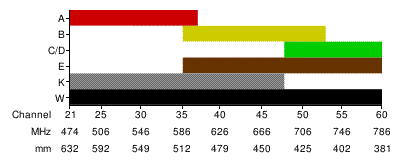 |
| B | 35 - 53 | Yellow |  | |
| C/D | 48 - 60 | Green |  | |
| E | 35 - 60 | Brown |  | |
| K | 21 - 48 | Grey |  | |
| W | 21 - 60 | Black or none |  | |
| Polarisation | Alignment Of Elements | |||
| H | Horizontal | — | ||
| V | Vertical | | | ||
Note that where a transmitter uses a semi-wideband group (E or K), Ofcom often suggest wideband (W) as an alternative, resulting in E/W or K/W. However, for performance reasons, I suspect that in such cases most professional installers would recommend the narrowest group aerial that can accommodate the signals required, and not a wideband.
UK Channel / Mux Help
The following channels are currently being broadcast in the UK:
| Mux | LCN | Channel Name | Genre | CI | E | NI | S | W |
|---|---|---|---|---|---|---|---|---|
| PSB1 | 1 | BBC One | General Entertainment | * | * | |||
| PSB1 | 1 | BBC One NI | General Entertainment | * | ||||
| PSB1 | 1 | BBC One Scotland | General Entertainment | * | ||||
| PSB1 | 1 | BBC One Wales | General Entertainment | * | ||||
| PSB1 | 2 | BBC Two | General Entertainment | * | * | |||
| PSB1 | 2 | BBC Two NI | General Entertainment | * | ||||
| PSB1 | 2 | BBC Two Scotland | General Entertainment | * | ||||
| PSB1 | 2 | BBC Two Wales | General Entertainment | * | ||||
| PSB1 | 7 | BBC Alba | General Entertainment | * | ||||
| PSB1 | 9 | BBC Four | General Entertainment | * | * | * | * | * |
| PSB1 | 120 | CBBC | Children's | * | * | * | * | * |
| PSB1 | 121 | CBeebies | Children's | * | * | * | * | * |
| PSB1 | 130 | BBC News | News | * | * | * | * | * |
| PSB1 | 131 | BBC Parliament | News | * | * | * | * | * |
| PSB1 | 200 | BBC Red Button | Text services | * | * | * | * | * |
| PSB1 | 600 | BBC RB 0 | Interactive | * | * | * | * | * |
| PSB1 | 601 | BBC RB 1 | Interactive | * | * | * | * | * |
| PSB1 | 700 | BBC Radio 1 | Radio | * | * | * | * | * |
| PSB1 | 701 | BBC R1X | Radio | * | * | * | * | * |
| PSB1 | 702 | BBC Radio 2 | Radio | * | * | * | * | * |
| PSB1 | 703 | BBC Radio 3 | Radio | * | * | * | * | * |
| PSB1 | 704 | BBC Radio 4 | Radio | * | * | * | * | * |
| PSB1 | 705 | BBC R5L | Radio | * | * | * | * | * |
| PSB1 | 706 | BBC 5SX | Radio | * | * | * | * | * |
| PSB1 | 707 | BBC 6 Music | Radio | * | * | * | * | * |
| PSB1 | 708 | BBC Radio 4 Ex | Radio | * | * | * | * | * |
| PSB1 | 709 | BBC Asian Network | Radio | * | * | * | * | * |
| PSB1 | 710 | BBC World Service | Radio | * | * | * | * | * |
| PSB1 | 719 | BBC Local Radio | Radio | * | * | |||
| PSB1 | 719 | BBC Radio Scotland | Radio | * | ||||
| PSB1 | 719 | BBC Radio Ulster | Radio | * | ||||
| PSB1 | 719 | BBC Radio Wales | Radio | * | ||||
| PSB1 | 720 | BBC Local Radio | Radio | * | ||||
| PSB1 | 720 | BBC Radio nan Gidheal | Radio | * | ||||
| PSB1 | 720 | BBC Radio Cymru | Radio | * | ||||
| PSB1 | 720 | BBC Radio Foyle | Radio | * | ||||
| PSB1 | 721 | BBC Local Radio | Radio | * | * | |||
| PSB1 | 722 | BBC Local Radio | Radio | * | ||||
| PSB1 | 734 | BBC Local Radio | Radio | * | ||||
| PSB1 | 735 | BBC Local Radio | Radio | * | ||||
| PSB2 | 3 | ITV | General Entertainment | * | * | |||
| PSB2 | 3 | ITV Wales | General Entertainment | * | ||||
| PSB2 | 3 | STV | General Entertainment | * | ||||
| PSB2 | 3 | UTV | General Entertainment | * | ||||
| PSB2 | 4 | Channel 4 | General Entertainment | * | * | * | * | |
| PSB2 | 4 | S4C | General Entertainment | * | ||||
| PSB2 | 5 | Channel 5 | General Entertainment | * | * | * | * | * |
| PSB2 | 6 | ITV 2 | General Entertainment | * | * | * | * | * |
| PSB2 | 7 | Channel 4 | General Entertainment | * | ||||
| PSB2 | 10 | ITV3 | General Entertainment | * | ||||
| PSB2 | 13 | Channel 4+1 | General Entertainment | * | * | * | * | * |
| PSB2 | 14 | More 4 | General Entertainment | * | * | * | * | * |
| PSB2 | 15 | Film4 | General Entertainment | * | * | * | * | * |
| PSB2 | 24 | ITV4 | General Entertainment | * | * | * | * | * |
| PSB2 | 28 | E4 | General Entertainment | * | * | * | * | |
| PSB2 | 33 | ITV +1 | General Entertainment | * | * | * | ||
| PSB2 | 33 | STV+1 | General Entertainment | * | ||||
| PSB2 | 33 | UTV+1 | General Entertainment | * | ||||
| PSB2 | 100 | Freeview Information | General Entertainment | * | * | * | * | * |
| PSB2 | 726 | U105 | Radio | * | ||||
| PSB3 | 45 | Film4+1 | General Entertainment | * | * | * | * | * |
| PSB3 | 101 | BBC 1 Scotland HD | HD | * | ||||
| PSB3 | 101 | BBC 1 Wales HD | HD | * | ||||
| PSB3 | 101 | BBC One HD | HD | * | * | |||
| PSB3 | 101 | BBC One NI HD | HD | * | ||||
| PSB3 | 102 | BBC Two HD | HD | * | * | * | * | * |
| PSB3 | 103 | ITV HD | HD | * | * | |||
| PSB3 | 103 | ITV Wales HD | HD | * | ||||
| PSB3 | 103 | STV HD | HD | * | ||||
| PSB3 | 103 | UTV HD | HD | * | ||||
| PSB3 | 104 | Channel 4 HD | HD | * | * | * | * | * |
| PSB3 | 105 | Channel 5 HD | HD | * | * | * | * | * |
| PSB3 | 123 | CBBC HD | Children's | * | * | * | * | * |
| ARQ A | 11 | Pick | General Entertainment | * | * | * | * | |
| ARQ A | 12 | Dave | General Entertainment | * | * | * | * | |
| ARQ A | 17 | Really | General Entertainment | * | * | * | * | |
| ARQ A | 23 | Create & Craft | General Entertainment | * | * | * | * | |
| ARQ A | 29 | E4+1 | General Entertainment | * | * | * | * | |
| ARQ A | 32 | Sony Movie Ch | General Entertainment | * | * | * | * | |
| ARQ A | 41 | Food Network | General Entertainment | * | * | * | * | |
| ARQ A | 43 | Gems TV | General Entertainment | * | * | * | * | |
| ARQ A | 46 | Challenge | General Entertainment | * | * | * | * | |
| ARQ A | 48 | movies4men | General Entertainment | * | * | * | * | |
| ARQ A | 49 | TJC | General Entertainment | * | * | * | * | |
| ARQ A | 65 | TBN UK | General Entertainment | * | * | * | * | |
| ARQ A | 68 | truTV | General Entertainment | * | * | * | * | |
| ARQ A | 69 | truTV+1 | General Entertainment | * | * | * | * | |
| ARQ A | 72 | YourTV | General Entertainment | * | * | * | * | |
| ARQ A | 126 | Tiny Pop | Children's | * | * | * | * | |
| ARQ A | 132 | Sky News | News | * | * | * | * | |
| ARQ A | 173 | ADULT smileTV3 | Adult | * | * | * | * | |
| ARQ A | 175 | ADULT PARTY | Adult | * | * | * | * | |
| ARQ A | 176 | ADULT Blue | Adult | * | * | * | * | |
| ARQ A | 177 | ADULT Babestn2 | Adult | * | * | * | * | |
| ARQ A | 207 | Kiss Me TV | Text services | * | * | * | * | |
| ARQ A | 208 | Proud Dating | Text services | * | * | * | * | |
| ARQ A | 723 | talkSPORT | Radio | * | * | * | * | |
| ARQ A | 730 | RNIB Connect | Radio | * | * | * | * | |
| ARQ B | 18 | 4Music | General Entertainment | * | * | * | * | |
| ARQ B | 19 | Yesterday | General Entertainment | * | * | * | * | |
| ARQ B | 22 | Ideal World | General Entertainment | * | * | * | * | |
| ARQ B | 25 | Home | General Entertainment | * | * | * | * | |
| ARQ B | 31 | Spike | General Entertainment | * | * | * | * | |
| ARQ B | 35 | QVC Beauty | General Entertainment | * | * | * | * | |
| ARQ B | 36 | QVC Style | General Entertainment | * | * | * | * | |
| ARQ B | 38 | QUEST+1 | General Entertainment | * | * | * | * | |
| ARQ B | 40 | Rocks & Co 1 | General Entertainment | * | * | * | * | |
| ARQ B | 42 | Travel Channel | General Entertainment | * | * | * | * | |
| ARQ B | 47 | 4seven | General Entertainment | * | * | * | * | |
| ARQ B | 59 | BT Showcase | General Entertainment | * | * | * | * | |
| ARQ B | 64 | CBS Action | General Entertainment | * | * | * | * | |
| ARQ B | 73 | YourTV+1 | General Entertainment | * | * | * | * | |
| ARQ B | 76 | Jewellery Maker | General Entertainment | * | * | * | * | |
| ARQ B | 78 | Sewing Quarter | General Entertainment | * | * | * | * | |
| ARQ B | 79 | Dave ja vu | General Entertainment | * | * | * | * | |
| ARQ B | 125 | POP | Children's | * | * | * | * | |
| ARQ B | 135 | RT | News | * | * | * | * | |
| ARQ B | 172 | ADULT smileTV2 | Adult | * | * | * | * | |
| ARQ B | 174 | ADULT Babestn | Adult | * | * | * | * | |
| ARQ B | 199 | ADULT Section | Adult | * | * | * | * | |
| ARQ B | 711 | The Hits Radio | Radio | * | * | * | * | |
| ARQ B | 712 | KISS FRESH | Radio | * | * | * | * | |
| ARQ B | 713 | Kiss | Radio | * | * | * | * | |
| ARQ B | 714 | KISSTORY | Radio | * | * | * | * | |
| ARQ B | 715 | Magic | Radio | * | * | * | * | |
| ARQ B | 716 | heat | Radio | * | * | * | * | |
| ARQ B | 717 | Kerrang! | Radio | * | * | * | * | |
| ARQ B | 718 | Smooth Radio | Radio | * | * | * | * | |
| ARQ B | 725 | Premier Radio | Radio | * | * | * | * | |
| ARQ B | 731 | Classic FM | Radio | * | * | * | * | |
| ARQ B | 732 | LBC | Radio | * | * | * | * | |
| SDN | 10 | ITV3 | General Entertainment | * | * | * | * | |
| SDN | 16 | QVC | General Entertainment | * | * | * | * | |
| SDN | 20 | Drama | General Entertainment | * | * | * | * | |
| SDN | 21 | 5 USA | General Entertainment | * | * | * | * | |
| SDN | 26 | ITVBe | General Entertainment | * | * | * | * | |
| SDN | 27 | ITV2 +1 | General Entertainment | * | * | * | * | |
| SDN | 28 | E4 | General Entertainment | * | ||||
| SDN | 30 | 5STAR | General Entertainment | * | * | * | * | |
| SDN | 34 | ITV3+1 | General Entertainment | * | * | * | * | |
| SDN | 37 | QUEST | General Entertainment | * | * | * | * | |
| SDN | 39 | The Store | General Entertainment | * | * | * | * | |
| SDN | 44 | Channel 5+1 | General Entertainment | * | * | * | * | |
| SDN | 54 | My5 | General Entertainment | * | * | * | * | |
| SDN | 58 | ITVBe+1 | General Entertainment | * | * | * | * | |
| SDN | 61 | True Entertainment | General Entertainment | * | * | * | ||
| SDN | 62 | ITV4+1 | General Entertainment | * | * | * | * | |
| SDN | 66 | CBS Reality | General Entertainment | * | * | * | * | |
| SDN | 70 | Horror Channel | General Entertainment | * | * | * | * | |
| SDN | 83 | Blaze | General Entertainment | * | * | * | * | |
| SDN | 84 | Blaze+1 | General Entertainment | * | * | * | * | |
| SDN | 85 | Hochanda | General Entertainment | * | * | * | * | |
| SDN | 95 | Children's Section | Children's | * | * | * | * | |
| SDN | 96 | Ketchup TV | Children's | * | * | * | * | |
| SDN | 122 | CITV | Children's | * | * | * | * | |
| SDN | 170 | ADULT Section | Adult | * | * | * | * | |
| SDN | 171 | Television X | Adult | * | * | * | * | |
| SDN | 182 | ADULT Xpanded TV | Adult | * | * | * | ||
| SDN | 185 | ADULT Studio 66 | Adult | * | * | * | * | |
| SDN | 201 | 365 Travel | Text services | * | * | * | * | |
| SDN | 226 | CCTV | Streamed channels | * | * | * | * | |
| SDN | 231 | Racing UK | Streamed channels | * | * | * | * | |
| SDN | 234 | CONNECT 4 | Streamed channels | * | * | * | * | |
| SDN | 239 | Sonlife | Streamed channels | * | * | * | * | |
| SDN | 244 | VisionTV | Streamed channels | * | * | * | * | |
| SDN | 246 | JSTV | Streamed channels | * | * | * | * | |
| SDN | 247 | kykNET | Streamed channels | * | * | * | * | |
| SDN | 249 | Huda TV | Streamed channels | * | * | * | * | |
| SDN | 250 | Revelation TV | Streamed channels | * | * | * | * | |
| SDN | 255 | Box Nation | Streamed channels | * | * | * | * | |
| SDN | 257 | Arise News | Streamed channels | * | * | * | * | |
| SDN | 258 | Loveworld | Streamed channels | * | * | * | * | |
| SDN | 724 | Capital | Radio | * | * | * | * | |
| SDN | 727 | Absolute Radio | Radio | * | * | * | * | |
| COM7 HD | 56 | 5USA+1 | General Entertainment | * | * | * | * | |
| COM7 HD | 57 | VIVA | General Entertainment | * | * | * | * | |
| COM7 HD | 67 | CBS Reality +1 | General Entertainment | * | * | * | * | |
| COM7 HD | 71 | CBS Drama | General Entertainment | * | * | * | * | |
| COM7 HD | 77 | Rishtey Europe | General Entertainment | * | * | * | * | |
| COM7 HD | 81 | TalkingPictures TV | General Entertainment | * | * | * | * | |
| COM7 HD | 82 | Vintage TV | General Entertainment | * | * | * | * | |
| COM7 HD | 87 | Keep It Country | General Entertainment | * | * | * | * | |
| COM7 HD | 106 | BBC Four HD | HD | * | * | * | * | |
| COM7 HD | 107 | BBC News HD | HD | * | * | * | * | |
| COM7 HD | 108 | Al Jazeera English HD | HD | * | * | * | * | |
| COM7 HD | 109 | Channel 4+1 HD | HD | * | * | * | * | |
| COM7 HD | 110 | 4seven HD | HD | * | * | * | * | |
| COM7 HD | 113 | RT HD | HD | * | * | * | * | |
| COM7 HD | 124 | CBeebies HD | Children's | * | * | * | * | |
| COM7 HD | 245 | Planet Knowledge | Streamed channels | * | * | * | * | |
| COM7 HD | 733 | Trans World Radio | Radio | * | * | * | * | |
| COM8 HD | 55 | 5STAR+1 | General Entertainment | * | * | * | * | |
| COM8 HD | 63 | Community | General Entertainment | * | * | * | * | |
| COM8 HD | 86 | More4+1 | General Entertainment | * | * | * | * | |
| COM8 HD | 88 | Rishtey Cineplex | General Entertainment | * | * | * | * | |
| COM8 HD | 91 | Front Runner | General Entertainment | * | * | * | * | |
| COM8 HD | 111 | QVC HD | HD | * | * | * | * | |
| COM8 HD | 112 | QVC Beauty HD | HD | * | * | * | * | |
| G-MAN | 50 | mov4men+1 | General Entertainment | * | ||||
| G-MAN | 75 | Chart Show TV | General Entertainment | * | ||||
| G-MAN | 80 | ShowBiz TV | General Entertainment | * | ||||
| G-MAN | 89 | Clubland TV | General Entertainment | * | ||||
| G-MAN | 128 | POP+1 | Children's | * | ||||
| G-MAN | 129 | Tiny Pop+1 | Children's | * | ||||
| Local | 7 | Local TV | General Entertainment | * | * | |||
| Local | 8 | Local TV | General Entertainment | * | * | * | ||
| Local | 60 | True Crime | General Entertainment | * | * | * | * | |
| Local | 74 | True Movies | General Entertainment | * | * | * | * | |
| Local | 127 | Kix | Children's | * | * | * | * | |
| NI Mux | 51 | TG4 | General Entertainment | * | ||||
| NI Mux | 52 | RTÉ One | General Entertainment | * | ||||
| NI Mux | 53 | RTÉ Two | General Entertainment | * | ||||
| NI Mux | 729 | RTÉ RnaG | Radio | * | ||||
| Mux | LCN | Channel Name | Genre | CI | E | NI | S | W |
|
This data changes quite frequently, for the latest information see the data source at Digital UK - Channel / Mux Listings ©. | ||||||||
The following multiplexes muxes are currently being broadcast in the UK:
| Name | Alternate Name(s) | Operator | Specifications | Comment |
|---|---|---|---|---|
| PSB1 | BBC A, Mux 1 | BBC | DVB-T: 64 QAM, code rate 2/3, 8K FFT | Standard Definition |
| PSB2 | D3&4, Mux 2 | Digital 3 & 4 | DVB-T: 64 QAM, code rate 2/3, 8K FFT | Standard Definition |
| PSB3 | BBC B, Mux B | BBC | DVB-T2: 256 QAM, code rate 2/3, 32K FFT | High Definition |
| COM4 | SDN, COM A, Mux A | SDN | DVB-T: 64 QAM, code rate 3/4, 8K FFT | Standard Definition |
| COM5 | Arqiva A, COM B, Mux C | Arqiva | DVB-T: 64-QAM, code rate 3/4, 8K FFT | Standard Definition |
| COM6 | Arqiva B, COM C, Mux D | Arqiva | DVB-T: 64-QAM, code rate 3/4, 8K FFT | Standard Definition |
| COM7 | Mux E, Arq 600 MHz Multiplex* | Arqiva | DVB-T2: 256 QAM, code rate 2/3, 32K FFT | High Definition |
| COM8 | Mux E, Arq 600 MHz Multiplex* | Arqiva | DVB-T2: 256 QAM, code rate 2/3, 32K FFT | High Definition |
| GIMux | Geographically Interleaved Spectrum Multiplexes (Manchester & Cardiff) | Entertainment Television Ltd (Manchester) Cube Interactive (Cardiff) | Manchester DVB-T: 16QAM, rate 3/4, 8K FFT | Cardiff not currently broadcasting |
| LTVMux | Local TV Multiplex* | Comux UK Ltd | DVB-T: QPSK, code rate 3/4, 8K FFT | Standard Definition |
| NIMux | Northern Ireland Multiplex | Multiplex Broadcasting Services NI Ltd | DVB-T2: QPSK, code rate 2/3, 32K FFT | Standard Definition (but needs UK High Definition receiver) |
Notes:
- DVB-T2 (HD) broadcasts cannot be received by DVB-T (SD) receivers
- * Some data included here for planned sites not yet broadcasting.
UK Transmitter Help
UK transmitters are arranged in groups with main transmitters, here shown in bright white, covering general geographical areas, and relays (sub-transmitters), here shown in off white, filling holes in the coverage of the main transmitters. Most main transmitters and some relays transmit all six main digital muxes, some of which also transmit further local muxes, but most relays only transmit the three PSB muxes. Transmitter information is available here for the entire UK, including the CI, the IoM, and NI. Sources are primarily Ofcom, but also Digital UK, and the BBC, see the links at the bottom of the page. Note that I am aware of some data conflicts between sources, and while I have endeavoured in good faith to resolve these correctly, it's unlikely that I have succeeded in every case, and while I apologise in advance for any errors that may be here, I accept no responsibility for their consequences.
For receiver locations within the UK, transmitters can be selected:
- Alphabetically from the entire UK List. For slow browsers on very slow machines, unavoidably this option may take a long time to appear after being chosen - this is because it takes such a time to load so many transmitters into the page element - so if the browser times the script out offering to cancel it, if you are prepared to let it run on at least two or three times, you will probably find that it will eventually complete and thereafter the page will work normally.
- Alphabetical list of transmitters broadcasting all of the six main digital muxes.
- By ITV region.
- By transmitter group.
- In distance order out to 100km, approximately 62 miles, default selection will be nearest main transmitter.
-
By searching to find those transmitters nearest to the receiver - up to five nearest each of relays, transmitters broadcasting all digital muxes, and mains - likely to give the strongest signals. Before using this feature, it's recommended to open the Google Map and exactly position the receiver marker (green). Thereafter, the marker can be adjusted up to 15m before terrain data will be refetched from the server.
It's important to understand that the accuracy of such predictive calculations will be limited by the completeness with which many factors (explained further in the General Introduction) are taken into account. The official Digital UK Postcode Checker has access to the best data, yet is considered 'pessimistic' because of the strictness of its correction for availability over time, and because the interpretation of its results on a per post code basis leads to post codes with mixed reception being marked out of coverage, even for individual addresses within them that may be within coverage. By contrast, this one is probably too optimistic because, although it works from the actual location of the receiving aerial, it lacks transmitter radiation patterns and any correction for availability over time. Thus, although the predictions of either checker are a useful pointer, neither should be taken as fact, and wherever possible should be checked against other such information, preferably against actual measurement. In particular, signal levels given here should be regarded as likely relative rather than absolute. For comparison, minimum useable signal levels at the aerial are around 47dBµV/m for digital tuners.
Note that, during the search, the form and the markers on the map are locked, and occasionally and randomly, internet traffic or other problems may prevent completion and unlocking. In this situation there are several means of escape:
- A Cancel button is displayed whenever the calculator is locked;
- The search script has a timeout;
- Many browsers throw up a dialog box to allow breaking out of a script that has hung;
- A few older browsers may hog the CPU so much that cancellation has no effect, and then there will be no alternative to reloading the page, to aid which this option cannot be set via a URL parameter, it will be changed to the previous option on reload.
- Additionally, UK Place Name can be used to search for a transmitter of which the exact name is uncertain. Any transmitters so found will be inserted at the top of the results denoted by (Tx), and a dialog box will offer to select the first one found as the chosen transmitter. When a transmitter is chosen from the results, UK National List and the chosen transmitter are set.
Each transmitter broadcasts either 3, or 6 or more, digital muxes, each carrying many digital channels within the same spectrum space as formerly occupied by a single analogue channel. Five of the six standard muxes - PSB1, PSB2, COM4, COM5, & COM6 - are SD (DVB-T), PSB3 and the extra muxes COM7 & COM8 are HD (DVB-T2), while the NIMux, although SD, is also DVB-T2, and none of these latter can be decoded by SD (DVB-T) tuners.
Channels above 60 were released for 4G mobile data use during DSO, leaving 21 to 60 as the current range, but between 2017 and 2020 further channels above 50 @ 700MHz are to be released for mobile use. As with DSO, these ongoing changes will cause 'retune events' requiring local residents to retune equipment to pick up changes, some may even need new aerials. From 14/2/2017, just two weeks before the first channel release at Selkirk, further information should be available from the Freeview Advice Line on Freephone 0808 1000288, and from the Digital UK & Ofcom links at the bottom of this page.
It should be noted that there is great uncertainty as to whether and by how much 4G & 5G services will affect reception in those areas where TV continues to be broadcast on immediatly neighbouring channels. Homes can be provided with filters to be fitted to the aerial downlead, but some have doubted whether filters will really be able adequately to differentiate between the wanted TV signals and the unwanted mobile signals, as well as to what arrangements will be made to distribute these filters and whether and in what circumstances they will be chargeable to homeowners.
Notes
- Magnetic variance is computed by the 2015 World Magnetic Model, with estimated error less than 1° until 2020. Thereafter it will display in red, indicating the model's increasing unreliability over time, in which case you should attempt to get a more recent estimate for your location and enter it manually:
-
Browser compatibility notes (see also the next note about printing):
- ALL - Maps gobble up resources. If you create both types of map together without letting one complete before starting the other, or, after creating maps, many times change settings in the calculator or drag and zoom forcing continual redrawing, you may find that the Google map becomes blank, or there are jumbled tiles or holes in the OS map, or markers disappear from it, perhaps first from the print preview, then from the map proper. Such problems may resolve themselves given enough time, but now there is also an option to remove a broken map or signal profile by Ctrl-Clicking the relevant button, so it can be then be clicked again to redraw from scratch. However, particularly as Google Maps do not document a destroy function, it is questionable whether all the resources used are reclaimed when a map is removed, and, especially if you want to print the maps, you may have to reload the page with your chosen final settings, most easily done by clicking Submit on them, before creating one map at a time, allowing each to load fully before creating the next.
- FF - The oldest legacy versions cannot be supported, but any version including and after 12 that has been tested has been proved to work.
- IE - Google's policy of only supporting the latest three versions of any browser means that any version of IE prior to 8 cannot run this page.
- Opera - The oldest legacy versions cannot be supported, but v12 seems to work as long as an Opera inbuilt extension is turned off - about:config, Extensions, EcmaScriptJIT needs to be disabled. Of the newer Webkit versions, only 43 has been specifically tested and shown to work, but Webkit browsers generally are known to work.
-
Each map is designed to print on a single page of A4 or Letter with top and bottom margins of about
15mm and side margins of about 10mm. This site has better map printing support than many, but
generally printing web content is too often neglected, not least by those who create browsers, and
maps particularly so. In the past I've reported problems to Microsoft, Opera, Google, and
OpenLayers, yet problems remained long outstanding, though recent testing has shown a marked
improvement in some browsers.
- ALL - Print the Google Satellite Base Layer without the labels. The latter tend to look fine in Print Preview but prevent the map printing properly. IE8+ & FF3+ may print them properly, but legacy browsers tend to print only the label & map overlay, without the satellite imagery.
- FF3 - Printing individual map pages results in blank maps, you have to print the entire document to get the maps to print properly. Fixed in v3.5.1.
- IE - continues its abysmal history printing maps - of the versions still actually supported by Google, IE8/9 won't print either map correctly, IE10/11 will only print the Google map correctly.
- Chrome - Earlier versions may insert spurious blank pages.
- Safari - Earlier versions may not print the Google Map - please upgrade to the latest version.
- Opera - Legacy version map printing was abysmal; Webkit versions have not been specifically tested, but see the notes above about Chrome and Safari.
Apologies for these inconveniences.